
msphere
Montessori record-keeping & school management software
Start on the home page for the full product — classroom records, family portal, and school operations.
Montessori record keeping
Montessori record keeping, built for Montessori.
msphere is the Montessori record keeping app that tracks every child's curriculum progress, observations, and daily care — searchable, time-stamped, and accessible to guides, school leaders, and families in real time.
Guide
What is Montessori record keeping?
Montessori record keeping is the practice of documenting a child's progress through the Montessori curriculum — which materials they've been presented, which they're working on, and which they've mastered — alongside daily observations, care events, and the artifacts that make up a student's portfolio. Because Montessori classrooms follow the child rather than a fixed lesson plan, guides rely on these records to know exactly where each child stands in their individual work cycle, across every curriculum area.
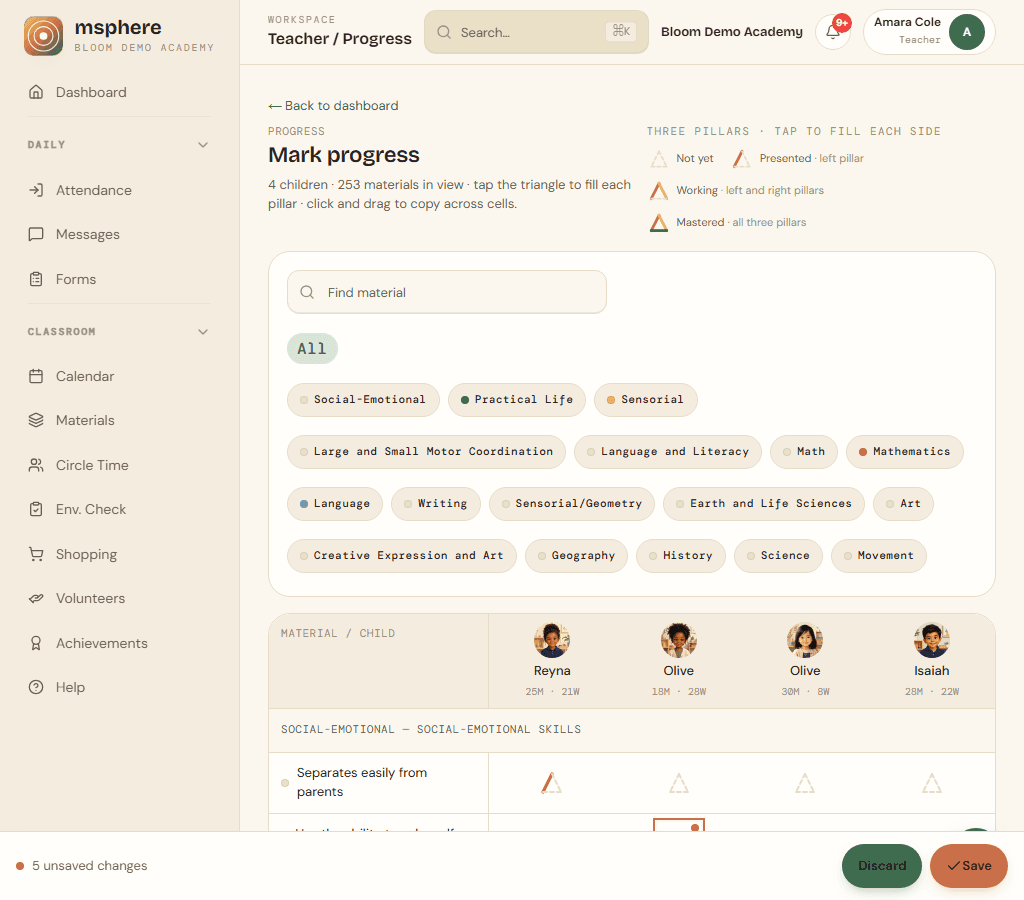
When that work happens on a phone or tablet in the classroom, it is a Montessori record keeping app: the same Presented / Working / Mastered matrix, written on the floor instead of recopied into a binder after dismissal.
What records does a Montessori classroom keep?
Most Montessori schools keep three layers of records: a curriculum progress record that tracks each material through Presented, Working, and Mastered; a daily observation log that captures what a guide sees a child do, say, or choose; and a student portfolio that curates the most meaningful observations and milestones over the term for families and accreditation. Many schools also track attendance, daily care (meals, naps, incidents), and forms or consents as part of the same record-keeping system.
Why Montessori record keeping matters
Good records let a guide pick up exactly where a child left off, let school leaders spot students who haven't been observed recently, and let families see real evidence of their child's growth instead of a generic report card. They're also the paper trail schools need for state licensing, accreditation visits, and parent conferences.
Paper binders vs. digital record keeping
Traditionally, this all lived in paper binders, progress ledgers, and observation notebooks — durable, but slow to search, easy to lose, and invisible to anyone not standing in the room. Digital record keeping keeps the same three layers (curriculum progress, observations, portfolios) but makes them searchable, timestamped, and visible to the right people — the guide who wrote them, the leader who needs to see coverage across the school, and the family the record is ultimately for. See our full breakdown in paper vs. digital record keeping.
What msphere records
Three layers of record keeping, in one place.
Montessori record keeping covers more than progress binders — it includes the daily observation, the long-term portfolio, and everything in between. msphere holds all of it.
Curriculum progress records
Mark materials Presented, Working, and Mastered across practical life, language, math, sensorial, and culture. Every update is time-stamped and visible school-wide.
Observations & daily logs
Log what you see in seconds — notes, photos, meals, naps, and incidents. All entries are timestamped, attributed to the guide, and attached to each child's permanent record.
Student portfolios
Curate observations and milestones into a portfolio each family can access privately through the msphere parent portal.
For guides
Record keeping from the classroom, not the office.
Guides capture observations and mark progress from the classroom floor — no laptop, no binder. A complete history of each child's work is always one tap away.
- Curriculum progress matrixMove materials through Presented, Working, and Mastered across the full Montessori scope with a tap-and-drag interface.
- Observations in secondsJot a quick note or add a photo. Every entry is time-stamped and tied to a child and material automatically.
- Daily care recordsLog meals, naps, attendance, incidents, and medications without leaving your classroom roster.
- Permanent and searchableEvery record is stored indefinitely, searchable, and accessible to school leadership — no more digging through binders.
For school leaders
School-wide record visibility without the filing cabinet.
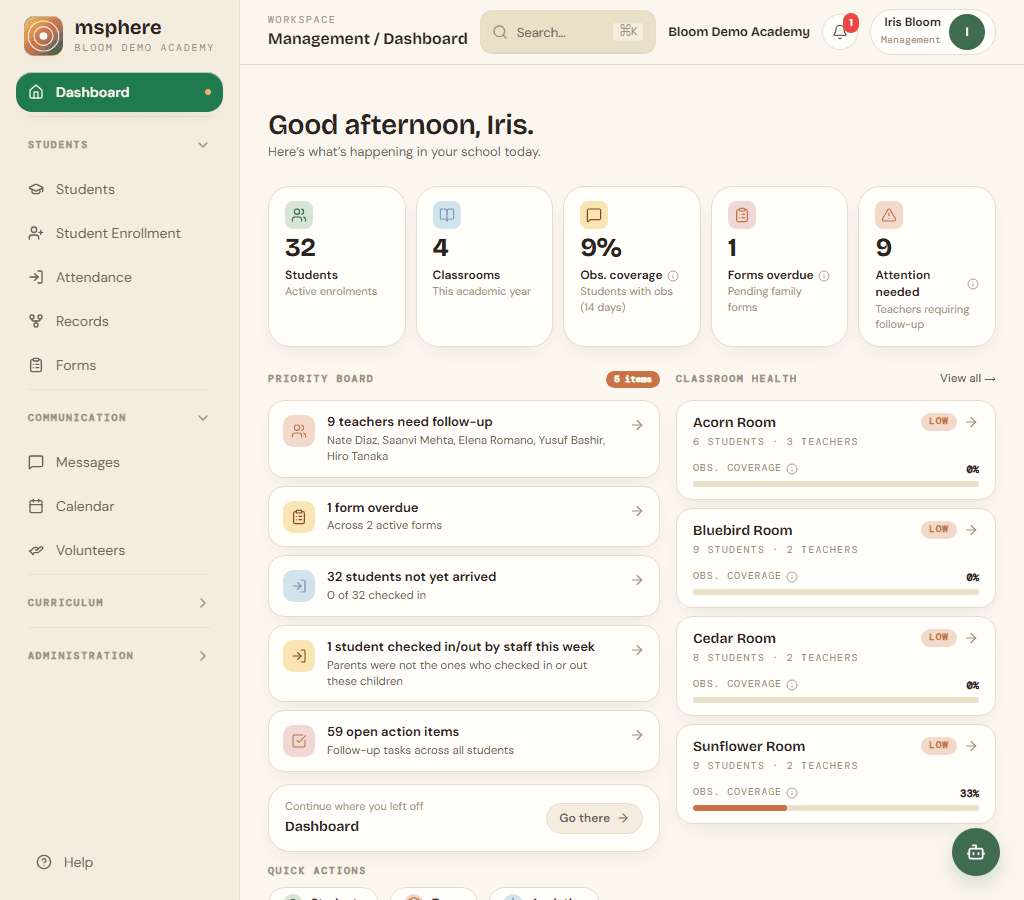
Leaders see observation coverage across every classroom, identify students who may need attention, and access any child's full record without leaving their desk.
- Coverage reportsSee which students have recent observations and which rooms are due for a check-in — updated automatically each week.
- Complete audit trailEvery observation, progress update, and daily log is time-stamped and attributed to the guide who made it.
- Staff and permissionsAssign classroom-specific access so each guide sees their students, while leaders see everything.
- Family-ready recordsShare curated portfolios with families through the private parent portal — entirely controlled by the school.
Paper to digital
Built to replace the binder.
Montessori record keeping has always been paper-intensive. msphere moves every layer of that system into a single, connected digital record — so guides spend less time on documentation and more time with children.
Paper observation notebooks
Timestamped digital notes, photos, and voice memos captured from the classroom.
Progress binders and ledgers
A color-coded curriculum matrix updated live by guides and searchable by any leader.
Spreadsheet attendance
Kiosk check-in, geofencing, and an always-current emergency roster.
Printed family progress reports
A live parent portal with journals, photos, and direct messaging with guides.
Questions
Common questions about Montessori record keeping in msphere
Can msphere replace paper-based Montessori record keeping?
Yes. msphere is designed to replace binders, paper trackers, and disconnected spreadsheets with a digital record-keeping system built for Montessori. Guides record observations, mark curriculum materials through Presented, Working, and Mastered, and build portfolios — all time-stamped, searchable, and visible to school leaders in real time.
What curriculum areas does msphere track?
msphere tracks student progress across all standard Montessori curriculum areas — practical life, sensorial, language, mathematics, culture, geography, history, science, botany, and zoology. Each area uses the Presented, Working, and Mastered workflow guides already know.
Can school leaders access all student records?
Yes. School administrators and leaders have school-wide access to every student's observation history, curriculum progress, and daily care records. Coverage reports surface which students have recent activity and which may need attention — without digging through individual binders.
How do families access their child's records?
Families access a private parent portal where guides share observations, photos, portfolio entries, and weekly journals. Schools control exactly what is shared and when — families only ever see their own child.
Is student record data secure and FERPA-compliant?
All student records in msphere are encrypted at rest and in transit. Access is strictly role-based — families only see their own children, and no student data is shared with third parties or used for advertising.
Can I export or print student records?
Yes. Guides and leaders can generate printable student portfolios and export progress records. The integrated worksheet library also supports printing three-part card materials and curriculum worksheets directly from the platform.
Get started
Existing school accounts can sign in now. New to msphere? Request a walkthrough of the record-keeping and progress-tracking tools.
msphere
Montessori record-keeping & school management software
Ready for the full picture? The home page is the msphere product overview.